ELF文件

可重定位文件

这类文件包含了代码和数据,可以被用来链接成可执行文件或共享目标文件,静态链接库也可以归为这一类。

可执行文件

这类文件包含了可以直接执行的程序。

共享目标文件

这类文件包含了代码和数据,可在以下两种情况下使用:

  • 链接器可以使用这种文件跟其他的可重定位文件和共享目标文件链接,产生新的目标文件。

  • 动态链接器可以将几个共享目标文件与可执行文件结合,作为进程映像的一部分来运行。

核心转储文件

ELF文件格式

文件头(ELF header)

我们首先看一下elf.h中的文件内容

1
2
3
4
5
6
7
8
9
10
11
12
13
14
15
16
17
18
19
20
21
22
23
24
25
26
27
28
29
30
31
32
33
34
35
36
37
38
/usr/include/elf.h
32
typedef struct
{
unsigned char e_ident[EI_NIDENT]; /* Magic number and other info */
Elf32_Half e_type; /* Object file type */
Elf32_Half e_machine; /* Architecture */
Elf32_Word e_version; /* Object file version */
Elf32_Addr e_entry; /* Entry point virtual address */
Elf32_Off e_phoff; /* Program header table file offset */
Elf32_Off e_shoff; /* Section header table file offset */
Elf32_Word e_flags; /* Processor-specific flags */
Elf32_Half e_ehsize; /* ELF header size in bytes */
Elf32_Half e_phentsize; /* Program header table entry size */
Elf32_Half e_phnum; /* Program header table entry count */
Elf32_Half e_shentsize; /* Section header table entry size */
Elf32_Half e_shnum; /* Section header table entry count */
Elf32_Half e_shstrndx; /* Section header string table index */
} Elf32_Ehdr;

64
typedef struct
{
unsigned char e_ident[EI_NIDENT]; /* Magic number and other info */
Elf64_Half e_type; /* Object file type */
Elf64_Half e_machine; /* Architecture */
Elf64_Word e_version; /* Object file version */
Elf64_Addr e_entry; /* Entry point virtual address */
Elf64_Off e_phoff; /* Program header table file offset */
Elf64_Off e_shoff; /* Section header table file offset */
Elf64_Word e_flags; /* Processor-specific flags */
Elf64_Half e_ehsize; /* ELF header size in bytes */
Elf64_Half e_phentsize; /* Program header table entry size */
Elf64_Half e_phnum; /* Program header table entry count */
Elf64_Half e_shentsize; /* Section header table entry size */
Elf64_Half e_shnum; /* Section header table entry count */
Elf64_Half e_shstrndx; /* Section header string table index */
} Elf64_Ehdr;
  • e_ident: 16个字节
    1. 前四个字节:所有ELF文件都必须相同的标识码
    2. 第五个字节:标识ELF的文件类型
    3. 第六个字节:字节序
    4. 第七个字节:ELF文件主版本号
    5. 后面的9个字节ELF标准没有定义
  • e_type: ELF文件类型
  • e_machine:ELF文件的CPU平台属性
  • e_version:ELF文件版本
  • e_entry:ELF程序的入口虚拟地址
  • e_phoff:
  • e_shoff:段表在文件中的偏移
  • e_flags:ELF标识位,用来标识一些ELF文件平台相关的属性
  • e_ehsize:ELF文件头本身的大小
  • e_phentsize:
  • e_phnum:
  • e_shentsize:段表描述符的大小
  • e_shnum:段表描述符的数量,其值等于ELF文件中拥有的段的数量
  • e_shstrndx:段表字符串表所在的段在段表中的下标。

段表(Section header table)

1
2
3
4
5
6
7
8
9
10
11
12
13
14
15
16
17
18
19
20
21
22
23
24
25
26
27
28
29
/* Section header.  */

typedef struct
{
Elf32_Word sh_name; /* Section name (string tbl index) */
Elf32_Word sh_type; /* Section type */
Elf32_Word sh_flags; /* Section flags */
Elf32_Addr sh_addr; /* Section virtual addr at execution */
Elf32_Off sh_offset; /* Section file offset */
Elf32_Word sh_size; /* Section size in bytes */
Elf32_Word sh_link; /* Link to another section */
Elf32_Word sh_info; /* Additional section information */
Elf32_Word sh_addralign; /* Section alignment */
Elf32_Word sh_entsize; /* Entry size if section holds table */
} Elf32_Shdr;

typedef struct
{
Elf64_Word sh_name; /* Section name (string tbl index) */
Elf64_Word sh_type; /* Section type */
Elf64_Xword sh_flags; /* Section flags */
Elf64_Addr sh_addr; /* Section virtual addr at execution */
Elf64_Off sh_offset; /* Section file offset */
Elf64_Xword sh_size; /* Section size in bytes */
Elf64_Word sh_link; /* Link to another section */
Elf64_Word sh_info; /* Additional section information */
Elf64_Xword sh_addralign; /* Section alignment */
Elf64_Xword sh_entsize; /* Entry size if section holds table */
} Elf64_Shdr;
  • sh_name:段名
  • sh_type:段的类型
  • sh_flags:段的标志位
  • sh_addr:段虚拟地址
  • sh_offset:段在文件中的偏移
  • sh_size:段的长度
  • sh_link:段的链接信息
  • sh_info:段的链接信息
  • sh_addralign:段地址对齐
  • sh_entsize:项的长度

注意:段的名字对于编译器、链接器是有意义的,但是对于操作系统来说,并没有什么实质的意义,对于操作系统来说,一个段该如何处理取决于它的属性和权限。

段表的结构比较简单,它是一个以“Elf_Shdr”结构体为元素的数组,数组元素的个数等于段的个数,每个“Elf_Shdr”结构体对应一个段,“Elf_Shdr”又被称为段描述符。
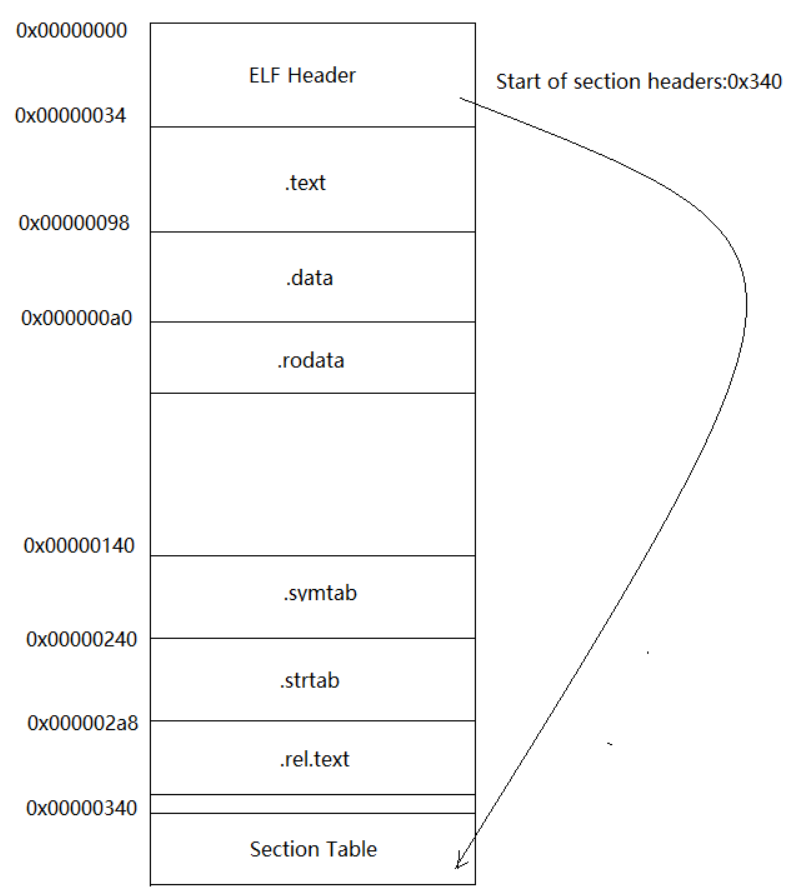
image-20201128130737448

Segment和Section?

一个“Segment”包含一个或多个属性类似的“Section”,对于相同权限的段,把它们合并在一起当作一个段进行映射。

映射以后在进程的虚拟空间中只有一个相对应的虚拟内存区域。这样做的好处是可以明显的减少页面内部碎片,从而节省内存空间。

“Segment”的概念实际上是从装载的角度重新划分了ELF的各个段,在将目标文件链接成可执行文件的时候,链接器会尽量把相同权限属性的段分配在同一空间。

总的来说,“Segment”和“Section”是从不同的角度来划分同一个ELF文件,从“Section”的角度来看就是链接视图,从“Segment”的角度来看就是执行视图。

Linux进程内存布局

img

看下面这段代码:

1
2
3
4
5
6
7
8
9
10
11
12
13
14
15
16
17
18
19
20
21
22
23
24
25
26
27
28
29
30
31
32
33
34
35
36
37
38
39
40
41
42
43
44
45
46
47
48
49
50
51
52
53
54
55
56
57
58
59
60
61
62
63
64
65
66
67
68
69
70
71
72
73
74
75
76
test.c

#include<stdio.h>
#include<stdlib.h>
#include<unistd.h>

int A;
int B=0;
int C=2;
static int D;
static int E=0;
static int F=4;
const int G=5;
const char H=6;

int main()
{
int a;

int b=0;

int c=2;

static int d;

static int e=0;

static int f=4;

const int g=5;

char char1[]="abcde";

char *cptr = "123456";

int *heap =malloc(sizeof(int)*4);

printf("PID is :%d\n",getpid());

printf("int A A_addr=%p\n",&A);
printf("int B=0 B_addr=%p\n",&B);
printf("int C=2 C_addr=%p\n",&C);
printf("static int D D_addr=%p\n",&D);
printf("static int E=0 E_addr=%p\n",&E);
printf("static int F=4 F_addr=%p\n",&F);
printf("static int G=5 G_addr=%p\n",&G);
printf("const int H=6 H_addr=%p\n",&H);

printf("\n");

printf("int a a_addr=%p\n",&a);
printf("int b=0 B_addr=%p\n",&b);
printf("int c=2 c_addr=%p\n",&c);

printf("\n");

printf("static int d d_addr=%p\n",&d);
printf("static int e=0 e_addr=%p\n",&e);
printf("static int f=4 f_addr=%p\n",&f);
printf("const int g=5 g_addr=%p\n",&g);

printf("\n");

printf("char char1[]='abcde'\t\t\t char1_addr=%p\n",char1);
printf("char char1[]='abcde'\t\t\t &char1_addr=%p\n",&char1);
printf("char *cptr ='1'\t\t\t\t cptr_addr=%p\n",&cptr);
printf("value of the cptr \t\t\t cptr_value=0x%p\n",cptr);
printf("value of %p \t\t\t value_0x%p = %d\n",cptr,cptr,*cptr);
printf("int* heap = malloc(sizeof(int)*4)\t heap_addr =%p\n",heap);
printf("int* heap = malloc(sizeof(int)*4)\t &heap_addr =%p\n",&heap);

pause();

free(heap);
return 0;
}
1
2
3
4
5
6
7
8
9
10
11
12
13
14
15
16
17
18
19
20
21
22
23
24
25
26
27
walkerrev_ll@ll-PC:~/Desktop/Linux/第12章$ ./test
PID is :44831
int A A_addr=0x40407c // 全局变量
int B=0 B_addr=0x404068 // 全局变量
int C=2 C_addr=0x404058 // 全局变量
static int D D_addr=0x40406c // 未初始化的全局静态变量
static int E=0 E_addr=0x404070 // 已经初始化的全局静态变量
static int F=4 F_addr=0x40405c // 已经初始化的全局静态变量
static int G=5 G_addr=0x402008 // 已经初始化的全局静态变量
const int H=6 H_addr=0x40200c // 只读的全局变量

int a a_addr=0x7ffdca74b5ac // 局部变量
int b=0 B_addr=0x7ffdca74b5a8 // 局部变量
int c=2 c_addr=0x7ffdca74b5a4 // 局部变量

static int d d_addr=0x404074 // 未初始化的局部静态变量
static int e=0 e_addr=0x404078 // 已经初始化的局部静态变量
static int f=4 f_addr=0x404060 // 已经初始化的局部静态变量
const int g=5 g_addr=0x7ffdca74b5a0 // 只读的局部变量

char char1[]='abcde' char1_addr=0x7ffdca74b59a // 局部变量
char char1[]='abcde' &char1_addr=0x7ffdca74b59a //
char *cptr ='1' cptr_addr=0x7ffdca74b590 // 指针局部变量
value of the cptr cptr_value=0x0x40200d
value of 0x40200d value_0x0x40200d = 49
int* heap = malloc(sizeof(int)*4) heap_addr =0xd34260 // 堆
int* heap = malloc(sizeof(int)*4) &heap_addr =0x7ffdca74b588 // 栈

我们查看test文件的各种段信息

1
2
3
4
5
6
7
8
9
10
11
12
13
14
15
16
17
18
19
20
21
22
23
24
25
26
27
28
29
30
31
32
33
34
35
36
37
38
39
40
41
42
43
44
45
46
47
48
49
50
51
52
53
54
55
56
57
58
59
60
61
62
63
64
65

test: 文件格式 elf64-x86-64

节:
Idx Name Size VMA LMA File off Algn
0 .interp 0000001c 00000000004002a8 00000000004002a8 000002a8 2**0
CONTENTS, ALLOC, LOAD, READONLY, DATA
1 .note.ABI-tag 00000020 00000000004002c4 00000000004002c4 000002c4 2**2
CONTENTS, ALLOC, LOAD, READONLY, DATA
2 .note.gnu.build-id 00000024 00000000004002e4 00000000004002e4 000002e4 2**2
CONTENTS, ALLOC, LOAD, READONLY, DATA
3 .gnu.hash 0000001c 0000000000400308 0000000000400308 00000308 2**3
CONTENTS, ALLOC, LOAD, READONLY, DATA
4 .dynsym 000000d8 0000000000400328 0000000000400328 00000328 2**3
CONTENTS, ALLOC, LOAD, READONLY, DATA
5 .dynstr 00000060 0000000000400400 0000000000400400 00000400 2**0
CONTENTS, ALLOC, LOAD, READONLY, DATA
6 .gnu.version 00000012 0000000000400460 0000000000400460 00000460 2**1
CONTENTS, ALLOC, LOAD, READONLY, DATA
7 .gnu.version_r 00000020 0000000000400478 0000000000400478 00000478 2**3
CONTENTS, ALLOC, LOAD, READONLY, DATA
8 .rela.dyn 00000030 0000000000400498 0000000000400498 00000498 2**3
CONTENTS, ALLOC, LOAD, READONLY, DATA
9 .rela.plt 00000090 00000000004004c8 00000000004004c8 000004c8 2**3
CONTENTS, ALLOC, LOAD, READONLY, DATA
10 .init 00000017 0000000000401000 0000000000401000 00001000 2**2
CONTENTS, ALLOC, LOAD, READONLY, CODE
11 .plt 00000070 0000000000401020 0000000000401020 00001020 2**4
CONTENTS, ALLOC, LOAD, READONLY, CODE
12 .text 000003b1 0000000000401090 0000000000401090 00001090 2**4
CONTENTS, ALLOC, LOAD, READONLY, CODE
13 .fini 00000009 0000000000401444 0000000000401444 00001444 2**2
CONTENTS, ALLOC, LOAD, READONLY, CODE
14 .rodata 000002c3 0000000000402000 0000000000402000 00002000 2**3
CONTENTS, ALLOC, LOAD, READONLY, DATA
15 .eh_frame_hdr 0000003c 00000000004022c4 00000000004022c4 000022c4 2**2
CONTENTS, ALLOC, LOAD, READONLY, DATA
16 .eh_frame 00000100 0000000000402300 0000000000402300 00002300 2**3
CONTENTS, ALLOC, LOAD, READONLY, DATA
17 .init_array 00000008 0000000000403e10 0000000000403e10 00002e10 2**3
CONTENTS, ALLOC, LOAD, DATA
18 .fini_array 00000008 0000000000403e18 0000000000403e18 00002e18 2**3
CONTENTS, ALLOC, LOAD, DATA
19 .dynamic 000001d0 0000000000403e20 0000000000403e20 00002e20 2**3
CONTENTS, ALLOC, LOAD, DATA
20 .got 00000010 0000000000403ff0 0000000000403ff0 00002ff0 2**3
CONTENTS, ALLOC, LOAD, DATA
21 .got.plt 00000048 0000000000404000 0000000000404000 00003000 2**3
CONTENTS, ALLOC, LOAD, DATA
22 .data 0000001c 0000000000404048 0000000000404048 00003048 2**3
CONTENTS, ALLOC, LOAD, DATA
23 .bss 0000001c 0000000000404064 0000000000404064 00003064 2**2
ALLOC
24 .comment 00000023 0000000000000000 0000000000000000 00003064 2**0
CONTENTS, READONLY
25 .debug_aranges 00000030 0000000000000000 0000000000000000 00003087 2**0
CONTENTS, READONLY, DEBUGGING
26 .debug_info 000004af 0000000000000000 0000000000000000 000030b7 2**0
CONTENTS, READONLY, DEBUGGING
27 .debug_abbrev 00000116 0000000000000000 0000000000000000 00003566 2**0
CONTENTS, READONLY, DEBUGGING
28 .debug_line 00000181 0000000000000000 0000000000000000 0000367c 2**0
CONTENTS, READONLY, DEBUGGING
29 .debug_str 0000028b 0000000000000000 0000000000000000 000037fd 2**0
CONTENTS, READONLY, DEBUGGING

我们再看一下进程中的虚拟空间分布:

1
2
3
4
5
6
7
8
9
10
11
12
13
14
15
16
17
18
19
20
21
22
23
24
25
26
27
28
29
30
31
32
33
34
35
36
37
38
39
walkerrev_ll@ll-PC:~/Desktop/Linux/第12章$ cat /proc/46748/maps
00400000-00401000 r--p 00000000 08:07 1055621

/home/walkerrev_ll/Desktop/Linux/第12章/test // .text
00401000-00402000 r-xp 00001000 08:07 1055621

/home/walkerrev_ll/Desktop/Linux/第12章/test
00402000-00403000 r--p 00002000 08:07 1055621 //

/home/walkerrev_ll/Desktop/Linux/第12章/test
00403000-00404000 r--p 00002000 08:07 1055621 //

/home/walkerrev_ll/Desktop/Linux/第12章/test
00404000-00405000 rw-p 00003000 08:07 1055621 //

/home/walkerrev_ll/Desktop/Linux/第12章/test
01776000-01797000 rw-p 00000000 00:00 0 [heap]

7f4d115bf000-7f4d115e1000 r--p 00000000 08:05 138774 /usr/lib/x86_64-linux-gnu/libc-2.28.so
7f4d115e1000-7f4d11729000 r-xp 00022000 08:05 138774 /usr/lib/x86_64-linux-gnu/libc-2.28.so
7f4d11729000-7f4d11775000 r--p 0016a000 08:05 138774 /usr/lib/x86_64-linux-gnu/libc-2.28.so
7f4d11775000-7f4d11776000 ---p 001b6000 08:05 138774 /usr/lib/x86_64-linux-gnu/libc-2.28.so
7f4d11776000-7f4d1177a000 r--p 001b6000 08:05 138774 /usr/lib/x86_64-linux-gnu/libc-2.28.so
7f4d1177a000-7f4d1177c000 rw-p 001ba000 08:05 138774 /usr/lib/x86_64-linux-gnu/libc-2.28.so
7f4d1177c000-7f4d11782000 rw-p 00000000 00:00 0
7f4d1179e000-7f4d1179f000 r--p 00000000 08:05 137789 /usr/lib/x86_64-linux-gnu/ld-2.28.so
7f4d1179f000-7f4d117bd000 r-xp 00001000 08:05 137789 /usr/lib/x86_64-linux-gnu/ld-2.28.so
7f4d117bd000-7f4d117c5000 r--p 0001f000 08:05 137789 /usr/lib/x86_64-linux-gnu/ld-2.28.so
7f4d117c5000-7f4d117c6000 r--p 00026000 08:05 137789 /usr/lib/x86_64-linux-gnu/ld-2.28.so
7f4d117c6000-7f4d117c7000 rw-p 00027000 08:05 137789 /usr/lib/x86_64-linux-gnu/ld-2.28.so

7f4d117c7000-7f4d117c8000 rw-p 00000000 00:00 0

7fff9ae98000-7fff9aebb000 rw-p 00000000 00:00 0 [stack]

7fff9af01000-7fff9af04000 r--p 00000000 00:00 0 [vvar]

7fff9af04000-7fff9af05000 r-xp 00000000 00:00 0 [vdso]
ffffffffff600000-ffffffffff601000 --xp 00000000 00:00 0 [vsyscall]

我们总结一下:

  • .data段保存的是那些已经初始化了的全局静态变量和局部静态变量
  • .rodata段存放的是只读数据,一般是程序里面的只读变量和字符串常量
  • .bss段存放的是未初始化的全局变量和局部静态变量
  • 程序被加载进内存之后,在执行的时候需要用到栈、堆等空间,他们在进程中的存在也是以虚拟内存区域的形式存在的
    1. 栈中存放的是局部变量
    2. 堆中的内存空间的是程序员自己手动申请的,使用完之后需要释放。