1、计算机是如何启动的?

实验环境

实验楼

实验工具:

Linux 0.11 源码

Bochs:Bochs 是一个免费且开放源代码的 IA-32(x86)架构 PC 机模拟器。在它模拟出的环境中可以运行 Linux、DOS 和各种版本的 Windows 等多种操作系统。

gcc

实验过程

## BIOS是如何被加载的

BIOS是由硬件(印在主板上的只读存储器ROM)加载的。

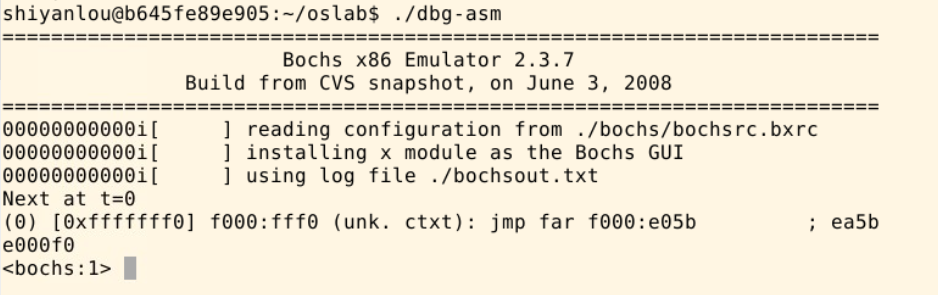
在接电的一瞬间,CPU的CS:IP寄存器被强制初始化为OxF000:OxFFF0 物理地址就是0xFFFF0 此地址就是BIOS的入口地址

image-20201130110136252

BOIS代码真正开始的地方是 0xfe05b处,接下来BIOS便马不停蹄的检测内存、显卡等外设信息,检测通过,然后就初始化硬件

BIOS最后一项工作是检验启动盘中位于0盘0道1扇区的内容,如果此扇区末尾最后两个字节是0x55和0xaa,就会跳转到0x7C00(MBR 主引导(bootsect))处继续去执行。

image-20201130110613140

# BootSect?

1
2
3
4
5
6
7
8
9
10
11
12
13
14
15
16
17
18
19
20
21
22
23
24
25
26
27
28
29
30
31
32
33
34
35
36
37
38
39
40
41
42
43
44
45
46
47
48
49
50
51
52
53
54
55
56
57
58
59
60
61
62
63
64
65
66
67
68
69
70
71
72
73
74
75
76
77
78
79
80
81
82
83
84
85
86
87
88
89
90
91
92
93
94
95
96
97
98
99
_start:
mov ax,#BOOTSEG
mov ds,ax
mov ax,#INITSEG
mov es,ax
mov cx,#256
sub si,si
sub di,di
rep
movw
jmpi go,INITSEG
go: mov ax,cs
mov ds,ax
mov es,ax
! put stack at 0x9ff00.
mov ss,ax
mov sp,#0xFF00 ! arbitrary value >>512

! load the setup-sectors directly after the bootblock.
! Note that 'es' is already set up.

// BIOS读取磁盘扇区中断

load_setup:
mov dx,#0x0000 ! drive 0, head 0
mov cx,#0x0002 ! sector 2, track 0
mov bx,#0x0200 ! address = 512, in INITSEG
mov ax,#0x0200+SETUPLEN ! service 2, nr of sectors
int 0x13 ! read it
jnc ok_load_setup ! ok - continue
mov dx,#0x0000
mov ax,#0x0000 ! reset the diskette
int 0x13
j load_setup

ok_load_setup:

// 载入Setup模块

! Get disk drive parameters, specifically nr of sectors/track

mov dl,#0x00
mov ax,#0x0800 ! AH=8 is get drive parameters
int 0x13
mov ch,#0x00
seg cs
mov sectors,cx
mov ax,#INITSEG
mov es,ax

! Print some inane message

// 打印信息

mov ah,#0x03 ! read cursor pos
xor bh,bh
int 0x10

mov cx,#24
mov bx,#0x0007 ! page 0, attribute 7 (normal)
mov bp,#msg1
mov ax,#0x1301 ! write string, move cursor
int 0x10
! ok, we've written the message, now
! we want to load the system (at 0x10000)

mov ax,#SYSSEG
mov es,ax ! segment of 0x010000
call read_it // 读入system模块
call kill_motor

! After that we check which root-device to use. If the device is
! defined (!= 0), nothing is done and the given device is used.
! Otherwise, either /dev/PS0 (2,28) or /dev/at0 (2,8), depending
! on the number of sectors that the BIOS reports currently.

seg cs
mov ax,root_dev
cmp ax,#0
jne root_defined
seg cs
mov bx,sectors
mov ax,#0x0208 ! /dev/ps0 - 1.2Mb
cmp bx,#15
je root_defined
mov ax,#0x021c ! /dev/PS0 - 1.44Mb
cmp bx,#18
je root_defined
undef_root:
jmp undef_root
root_defined:
seg cs
mov root_dev,ax

! after that (everyting loaded), we jump to
! the setup-routine loaded directly after
! the bootblock:

jmpi 0,SETUPSEG

上面这段代码是Linux 0.11 中的源代码

分析这段代码可以看出来:

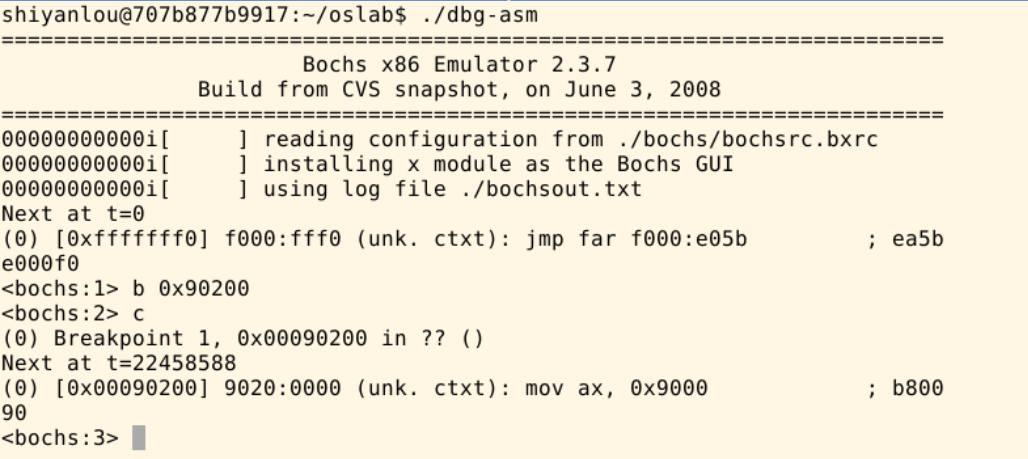
为了防止从0x7C00开始的引导代码被破坏,首先把从这里开始的512字节的代码复制到0x90000处,然后跳转到那里去执行,然后读取磁盘的内容,读入Setup模块以及System模块,并打印信息,然后跳转到 0x90200处去执行。

image-20201130123404351

# Setup?

Setup模块将完成操作系统启动前的设置。

1
2
3
4
5
6
7
8
9
10
11
12
13
14
15
16
17
18
19
20
21
22
23
24
25
26
27
28
29
30
31
32
33
34
35
36
37
38
39
40
41
42
43
44
45
46
47
48
49
50
51
52
53
54
55
56
57
58
59
60
61
62
63
64
65
66
67
68
69
70
71
72
73
74
75
76
77
78
79
80
81
82
83
84
85
86
87
88
89
90
91
92
93
94
95
96
97
98
99
100
101
102
103
104
105
106
107
108
109
110
111
112
113
114
115
116
117
118
119
120
121
122
123
124
125
126
127
128
129
130
131
132
133
134
135
136
137
138
139
140
141
142
143
144
145
146
147
148
149
150
151
152
153
154
155
156
157
158
159
160
161
162
163
164
165
166
167
168
169
170
171
172
173
174
175
176
177
178
179
180
181
182
183
184
185
186
187
188
189
190
191
192
193
194
195
196
start:

! ok, the read went well so we get current cursor position and save it for
! posterity.

mov ax,#INITSEG ! this is done in bootsect already, but...
mov ds,ax
mov ah,#0x03 ! read cursor pos
xor bh,bh
int 0x10 ! save it in known place, con_init fetches
mov [0],dx ! it from 0x90000.
! Get memory size (extended mem, kB)

mov ah,#0x88
int 0x15
mov [2],ax

// 获取内存容量

! Get video-card data:

mov ah,#0x0f
int 0x10
mov [4],bx ! bh = display page
mov [6],ax ! al = video mode, ah = window width

! check for EGA/VGA and some config parameters

mov ah,#0x12
mov bl,#0x10
int 0x10
mov [8],ax
mov [10],bx
mov [12],cx

! Get hd0 data

mov ax,#0x0000
mov ds,ax
lds si,[4*0x41]
mov ax,#INITSEG
mov es,ax
mov di,#0x0080
mov cx,#0x10
rep
movsb

! Get hd1 data

mov ax,#0x0000
mov ds,ax
lds si,[4*0x46]
mov ax,#INITSEG
mov es,ax
mov di,#0x0090
mov cx,#0x10
rep
movsb

! Check that there IS a hd1 :-)

mov ax,#0x01500
mov dl,#0x81
int 0x13
jc no_disk1
cmp ah,#3
je is_disk1
no_disk1:
mov ax,#INITSEG
mov es,ax
mov di,#0x0090
mov cx,#0x10
mov ax,#0x00
rep
stosb
is_disk1:

! now we want to move to protected mode ...

cli ! no interrupts allowed !

! first we move the system to it's rightful place

mov ax,#0x0000
cld ! 'direction'=0, movs moves forward
do_move:
mov es,ax ! destination segment
add ax,#0x1000
cmp ax,#0x9000
jz end_move
mov ds,ax ! source segment
sub di,di
sub si,si
mov cx,#0x8000
rep
movsw
jmp do_move

! then we load the segment descriptors

end_move:
mov ax,#SETUPSEG ! right, forgot this at first. didn't work :-)
mov ds,ax
lidt idt_48 ! load idt with 0,0
lgdt gdt_48 ! load gdt with whatever appropriate

! that was painless, now we enable A20

call empty_8042
mov al,#0xD1 ! command write
out #0x64,al
call empty_8042
mov al,#0xDF ! A20 on
out #0x60,al
call empty_8042

! well, that went ok, I hope. Now we have to reprogram the interrupts :-(
! we put them right after the intel-reserved hardware interrupts, at
! int 0x20-0x2F. There they won't mess up anything. Sadly IBM really
! messed this up with the original PC, and they haven't been able to
! rectify it afterwards. Thus the bios puts interrupts at 0x08-0x0f,
! which is used for the internal hardware interrupts as well. We just
! have to reprogram the 8259's, and it isn't fun.

mov al,#0x11 ! initialization sequence
out #0x20,al ! send it to 8259A-1
.word 0x00eb,0x00eb ! jmp $+2, jmp $+2
out #0xA0,al ! and to 8259A-2
.word 0x00eb,0x00eb
mov al,#0x20 ! start of hardware int's (0x20)
out #0x21,al
.word 0x00eb,0x00eb
mov al,#0x28 ! start of hardware int's 2 (0x28)
out #0xA1,al
.word 0x00eb,0x00eb
mov al,#0x04 ! 8259-1 is master
out #0x21,al
.word 0x00eb,0x00eb
mov al,#0x02 ! 8259-2 is slave
out #0xA1,al
.word 0x00eb,0x00eb
mov al,#0x01 ! 8086 mode for both
out #0x21,al
.word 0x00eb,0x00eb
out #0xA1,al
.word 0x00eb,0x00eb
mov al,#0xFF ! mask off all interrupts for now
out #0x21,al
.word 0x00eb,0x00eb
out #0xA1,al

! well, that certainly wasn't fun :-(. Hopefully it works, and we don't
! need no steenking BIOS anyway (except for the initial loading :-).
! The BIOS-routine wants lots of unnecessary data, and it's less
! "interesting" anyway. This is how REAL programmers do it.
!
! Well, now's the time to actually move into protected mode. To make
! things as simple as possible, we do no register set-up or anything,
! we let the gnu-compiled 32-bit programs do that. We just jump to
! absolute address 0x00000, in 32-bit protected mode.

mov ax,#0x0001 ! protected mode (PE) bit // 置位
lmsw ax ! This is it! // mov cr0,ax
jmpi 0,8 ! jmp offset 0 of segment 8 (cs) // 临时建立GDT表

! This routine checks that the keyboard command queue is empty
! No timeout is used - if this hangs there is something wrong with
! the machine, and we probably couldn't proceed anyway.

empty_8042:
.word 0x00eb,0x00eb
in al,#0x64 ! 8042 status port
test al,#2 ! is input buffer full?
jnz empty_8042 ! yes - loop
ret

gdt:
.word 0,0,0,0 ! dummy

.word 0x07FF ! 8Mb - limit=2047 (2048*4096=8Mb)
.word 0x0000 ! base address=0
.word 0x9A00 ! code read/exec
.word 0x00C0 ! granularity=4096, 386

.word 0x07FF ! 8Mb - limit=2047 (2048*4096=8Mb)
.word 0x0000 ! base address=0
.word 0x9200 ! data read/write
.word 0x00C0 ! granularity=4096, 386

idt_48:
.word 0 ! idt limit=0
.word 0,0 ! idt base=0L

gdt_48:
.word 0x800 ! gdt limit=2048, 256 GDT entries
.word 512+gdt,0x9 ! gdt base = 0X9xxxx

分析这段源代码,我们可以看出首先通过BIOS中断取出各种硬件信息(包括内存容量,硬盘等各种信息),并将信息保存在0x90000处

然后将System模块移动到0x00000处,加载中断描述表寄存器,和全局描述符表寄存器,开始A20地址线,设置两个中断控制芯片8259A,将硬件中断号重新设置,最后设置CPU控制寄存器CR0,进入32位保护模式运行。最后跳转到0x00000000地址处(System处)去执行。

image-20201130140851629

# Head?

1
2
3
4
5
6
7
8
9
10
11
12
13
14
15
16
17
18
19
20
21
22
23
24
25
26
27
28
29
30
31
32
33
34
35
36
37
38
39
40
41
42
43
44
45
46
47
48
49
50
51
52
53
54
55
56
57
58
59
60
61
62
63
64
65
66
67
68
69
70
71
72
73
74
75
76
77
78
79
80
81
82
83
84
85
86
87
88
89
90
91
92
93
94
95
96
97
98
99
100
101
102
103
104
105
106
107
108
109
110
111
112
113
114
115
116
117
118
119
120
121
122
123
124
125
126
127
128
129
130
131
132
133
134
135
136
137
138
139
140
141
142
143
144
145
146
147
148
149
150
151
152
153
154
155
156
157
158
159
160
161
162
163
164
165
166
167
168
169
170
171
172
173
174
175
176
177
178
179
180
181
182
183
184
185
186
187
188
189
190
191
192
193
194
195
196
197
198
199
200
201
202
203
204
205
206
207
208
209
210
211
212
213
214
215
216
217
218
219
220
221
222
223
224
225
226
227
.text
.globl idt,gdt,pg_dir,tmp_floppy_area
pg_dir:
.globl startup_32
startup_32:
movl $0x10,%eax
mov %ax,%ds
mov %ax,%es
mov %ax,%fs
mov %ax,%gs
lss stack_start,%esp
call setup_idt // 建立idt表
call setup_gdt // 建立gdt表
movl $0x10,%eax # reload all the segment registers
mov %ax,%ds # after changing gdt. CS was already
mov %ax,%es # reloaded in 'setup_gdt'
mov %ax,%fs
mov %ax,%gs
lss stack_start,%esp
xorl %eax,%eax
1: incl %eax # check that A20 really IS enabled
movl %eax,0x000000 # loop forever if it isn't
cmpl %eax,0x100000
je 1b

/*
* NOTE! 486 should set bit 16, to check for write-protect in supervisor
* mode. Then it would be unnecessary with the "verify_area()"-calls.
* 486 users probably want to set the NE (#5) bit also, so as to use
* int 16 for math errors.
*/
movl %cr0,%eax # check math chip
andl $0x80000011,%eax # Save PG,PE,ET
/* "orl $0x10020,%eax" here for 486 might be good */
orl $2,%eax # set MP
movl %eax,%cr0
call check_x87
jmp after_page_tables

/*
* We depend on ET to be correct. This checks for 287/387.
*/
check_x87:
fninit
fstsw %ax
cmpb $0,%al
je 1f /* no coprocessor: have to set bits */
movl %cr0,%eax
xorl $6,%eax /* reset MP, set EM */
movl %eax,%cr0
ret
.align 2
1: .byte 0xDB,0xE4 /* fsetpm for 287, ignored by 387 */
ret

/*
* setup_idt
*
* sets up a idt with 256 entries pointing to
* ignore_int, interrupt gates. It then loads
* idt. Everything that wants to install itself
* in the idt-table may do so themselves. Interrupts
* are enabled elsewhere, when we can be relatively
* sure everything is ok. This routine will be over-
* written by the page tables.
*/
setup_idt:
lea ignore_int,%edx
movl $0x00080000,%eax
movw %dx,%ax /* selector = 0x0008 = cs */
movw $0x8E00,%dx /* interrupt gate - dpl=0, present */

lea idt,%edi
mov $256,%ecx
rp_sidt:
movl %eax,(%edi)
movl %edx,4(%edi)
addl $8,%edi
dec %ecx
jne rp_sidt
lidt idt_descr
ret

/*
* setup_gdt
*
* This routines sets up a new gdt and loads it.
* Only two entries are currently built, the same
* ones that were built in init.s. The routine
* is VERY complicated at two whole lines, so this
* rather long comment is certainly needed :-).
* This routine will beoverwritten by the page tables.
*/
setup_gdt:
lgdt gdt_descr
ret

/*
* I put the kernel page tables right after the page directory,
* using 4 of them to span 16 Mb of physical memory. People with
* more than 16MB will have to expand this.
*/
.org 0x1000
pg0:

.org 0x2000
pg1:

.org 0x3000
pg2:

.org 0x4000
pg3:

.org 0x5000
/*
* tmp_floppy_area is used by the floppy-driver when DMA cannot
* reach to a buffer-block. It needs to be aligned, so that it isn't
* on a 64kB border.
*/
tmp_floppy_area:
.fill 1024,1,0

after_page_tables:
pushl $0 # These are the parameters to main :-)
pushl $0
pushl $0
pushl $L6 # return address for main, if it decides to.
pushl $main
jmp setup_paging
L6:
jmp L6 # main should never return here, but
# just in case, we know what happens.

/* This is the default interrupt "handler" :-) */
int_msg:
.asciz "Unknown interrupt\n\r"
.align 2
ignore_int:
pushl %eax
pushl %ecx
pushl %edx
push %ds
push %es
push %fs
movl $0x10,%eax
mov %ax,%ds
mov %ax,%es
mov %ax,%fs
pushl $int_msg
call printk
popl %eax
pop %fs
pop %es
pop %ds
popl %edx
popl %ecx
popl %eax
iret


/*
* Setup_paging
*
* This routine sets up paging by setting the page bit
* in cr0. The page tables are set up, identity-mapping
* the first 16MB. The pager assumes that no illegal
* addresses are produced (ie >4Mb on a 4Mb machine).
*
* NOTE! Although all physical memory should be identity
* mapped by this routine, only the kernel page functions
* use the >1Mb addresses directly. All "normal" functions
* use just the lower 1Mb, or the local data space, which
* will be mapped to some other place - mm keeps track of
* that.
*
* For those with more memory than 16 Mb - tough luck. I've
* not got it, why should you :-) The source is here. Change
* it. (Seriously - it shouldn't be too difficult. Mostly
* change some constants etc. I left it at 16Mb, as my machine
* even cannot be extended past that (ok, but it was cheap :-)
* I've tried to show which constants to change by having
* some kind of marker at them (search for "16Mb"), but I
* won't guarantee that's all :-( )
*/
.align 2
setup_paging:
movl $1024*5,%ecx /* 5 pages - pg_dir+4 page tables */
xorl %eax,%eax
xorl %edi,%edi /* pg_dir is at 0x000 */
cld;rep;stosl
movl $pg0+7,pg_dir /* set present bit/user r/w */
movl $pg1+7,pg_dir+4 /* --------- " " --------- */
movl $pg2+7,pg_dir+8 /* --------- " " --------- */
movl $pg3+7,pg_dir+12 /* --------- " " --------- */
movl $pg3+4092,%edi
movl $0xfff007,%eax /* 16Mb - 4096 + 7 (r/w user,p) */
std
1: stosl /* fill pages backwards - more efficient :-) */
subl $0x1000,%eax
jge 1b
xorl %eax,%eax /* pg_dir is at 0x0000 */
movl %eax,%cr3 /* cr3 - page directory start */
movl %cr0,%eax
orl $0x80000000,%eax
movl %eax,%cr0 /* set paging (PG) bit */


.align 2
.word 0
idt_descr:
.word 256*8-1 # idt contains 256 entries
.long idt
.align 2
.word 0
gdt_descr:
.word 256*8-1 # so does gdt (not that that's any
.long gdt # magic number, but it works for me :^)

.align 8
idt: .fill 256,8,0 # idt is uninitialized

gdt: .quad 0x0000000000000000 /* NULL descriptor */
.quad 0x00c09a0000000fff /* 16Mb */
.quad 0x00c0920000000fff /* 16Mb */
.quad 0x0000000000000000 /* TEMPORARY - don't use */
.fill 252,8,0 /* space for LDT's and TSS's etc */

Head是完成进入保护模式之后的初始化

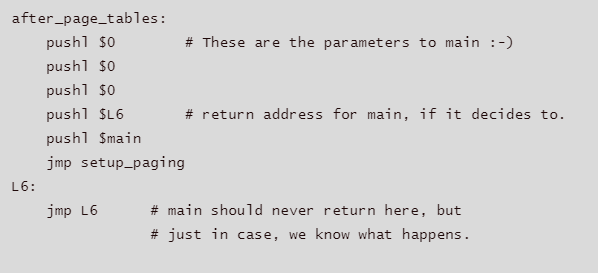
image-20201130135551818

通过汇编实现对C(main函数)的调用。

# Main函数?

对硬件逐个初始化。

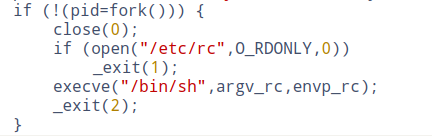
然后调用fork函数创建进程

image-20201130140317357